3 Essential Productivity Apps for Remote Workers
Discover 3 essential productivity apps that can transform your remote work efficiency and focus.
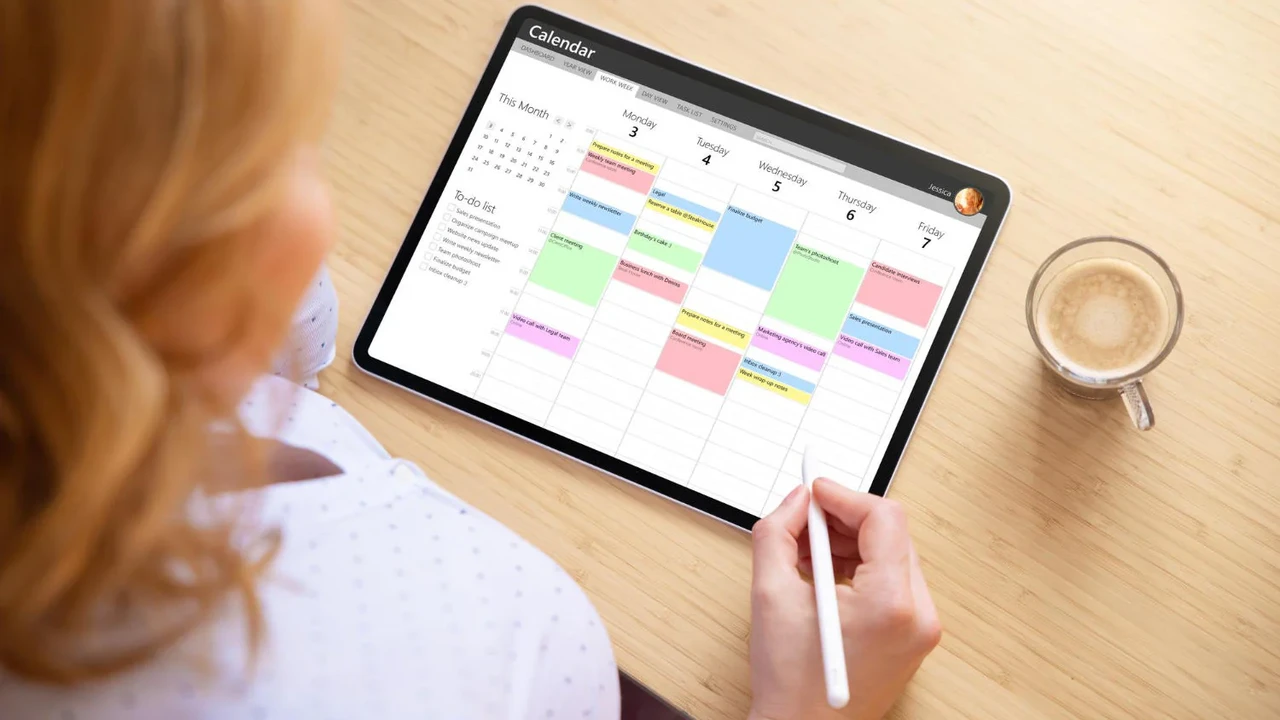
Discover 3 essential productivity apps that can transform your remote work efficiency and focus.
3 Essential Productivity Apps for Remote Workers
Hey there, remote warriors! Working from home, or anywhere outside a traditional office, has become the new normal for so many of us. It’s fantastic for flexibility, but let’s be real, it also comes with its own set of challenges. Distractions are everywhere, communication can get tricky, and keeping track of everything can feel like herding cats. That’s where productivity apps come in. They’re not just fancy tools; they’re your secret weapons for staying organized, focused, and super efficient, no matter where your 'office' is.
In this deep dive, we’re going to explore three absolute game-changers that every remote worker should consider adding to their arsenal. We’ll look at what makes them great, how they stack up against each other, and even give you a peek at their pricing. Ready to boost your remote work game? Let’s jump in!
Task Management and Project Tracking for Remote Teams
First up, let’s talk about keeping all your tasks and projects in line. When you’re not physically together, it’s super easy for things to fall through the cracks. A solid task management app is non-negotiable for remote teams. It helps everyone know what they need to do, when it’s due, and how it fits into the bigger picture. For this category, we’re shining a spotlight on Asana.
Asana Your Remote Work Command Center
Asana is a powerhouse for task and project management, especially for distributed teams. It’s designed to help you organize, track, and manage your team’s work, ensuring everyone is on the same page and knows their responsibilities. Think of it as your digital whiteboard, to-do list, and project tracker all rolled into one.
Key Features of Asana for Remote Productivity
- Project Views: Asana offers multiple ways to visualize your work, including List, Board (Kanban), Timeline (Gantt chart), and Calendar views. This flexibility means you can choose the view that best suits your project and personal working style. For remote teams, the Timeline view is particularly useful for seeing project dependencies and potential bottlenecks across different time zones.
- Task Management: You can create tasks, assign them to team members, set due dates, add detailed descriptions, attach files, and even create subtasks. This level of detail ensures clarity, which is crucial when you can’t just lean over and ask a colleague.
- Communication and Collaboration: Each task and project has a dedicated comment section, allowing for direct communication related to specific work items. This centralizes discussions and reduces the need for endless email threads. You can also @mention colleagues to get their attention.
- Workload Management: Asana’s Workload feature helps managers see how tasks are distributed among team members, preventing burnout and ensuring fair allocation of work. This is invaluable for remote managers who can’t physically observe their team’s stress levels.
- Integrations: Asana plays nicely with a ton of other tools you probably already use, like Slack, Google Drive, Microsoft Teams, Zoom, and more. This seamless integration creates a unified workflow, reducing context switching.
Use Cases for Asana in a Remote Setting
- Marketing Campaigns: Plan content calendars, track campaign launches, and manage creative assets with ease.
- Software Development: Organize sprints, track bugs, and manage feature releases.
- Client Management: Keep track of client requests, project milestones, and communication history.
- Onboarding New Remote Hires: Create detailed onboarding checklists and assign tasks to ensure a smooth transition for new team members.
Asana Pricing and Value for Remote Teams
Asana offers a few different plans:
- Basic (Free): Great for individuals or small teams just starting out. It includes unlimited tasks, projects, messages, and file storage (up to 100MB per file). You can have up to 15 teammates.
- Premium ($10.99 per user/month, billed annually): Unlocks advanced features like Timeline, Workflow Builder, unlimited dashboards, and custom fields. This is where remote teams really start to see the benefits of Asana’s robust features.
- Business ($24.99 per user/month, billed annually): Adds even more advanced features like Portfolios, Workload, and advanced integrations. Ideal for larger organizations managing multiple projects and teams.
- Enterprise: Custom pricing for large organizations needing enhanced security, control, and support.
For most remote teams, the Premium plan offers the best balance of features and cost, providing the tools needed to manage complex projects and keep everyone aligned.
Communication and Collaboration Hubs for Distributed Workforces
Next up, let’s tackle communication. When you’re not sharing an office, effective communication becomes even more critical. You need a central place where your team can chat, share files, and have quick meetings without getting lost in email chains. Our pick for this category is Slack.
Slack Your Virtual Office Water Cooler and Meeting Room
Slack has become synonymous with team communication, and for good reason. It’s an instant messaging platform designed for the workplace, but it’s so much more than just chat. It’s a hub where conversations, files, and tools come together, making it feel like you’re all in the same room, even when you’re miles apart.
Key Features of Slack for Remote Communication
- Channels: This is the heart of Slack. You can create channels for specific projects, teams, topics, or even just for fun. This keeps conversations organized and ensures everyone has access to the information they need without being overwhelmed by irrelevant messages. For remote teams, channels help replicate the feeling of different departments or project rooms.
- Direct Messaging and Group DMs: For one-on-one chats or small group discussions, direct messages are quick and efficient.
- File Sharing: Easily share documents, images, and other files directly within channels or DMs. Slack integrates with cloud storage services like Google Drive and Dropbox, making file access seamless.
- Voice and Video Calls: Slack allows for instant voice and video calls directly within the platform, perfect for quick sync-ups or more formal meetings without needing to switch apps.
- Integrations: Slack boasts an incredible array of integrations with thousands of other apps, from project management tools like Asana to calendar apps, customer support platforms, and more. This makes it a true central hub for all your remote work tools.
- Search Functionality: With a powerful search feature, you can quickly find past conversations, files, and links, which is a lifesaver when you need to recall information from weeks or months ago.
Use Cases for Slack in a Remote Setting
- Daily Stand-ups: Teams can quickly share updates in a dedicated channel, keeping everyone informed without a formal meeting.
- Quick Questions and Answers: Instead of an email, a quick Slack message can get immediate answers, speeding up decision-making.
- Emergency Communications: For urgent announcements or issues, Slack provides a fast and reliable way to reach the entire team.
- Social Connection: Create non-work-related channels for water cooler chat, sharing hobbies, or celebrating successes, helping to build team camaraderie remotely.
Slack Pricing and Value for Remote Teams
Slack offers a tiered pricing structure:
- Free: A great starting point for small teams. It includes access to 10,000 searchable messages, 10 integrations, and one-to-one video calls.
- Pro ($7.25 per user/month, billed annually): Unlocks unlimited message history, unlimited integrations, group video calls, and screen sharing. This is the sweet spot for most growing remote teams.
- Business+ ($12.50 per user/month, billed annually): Adds features like 99.99% guaranteed uptime, data exports, and 24/7 support. Suitable for larger organizations with stricter compliance needs.
- Enterprise Grid: Custom pricing for very large organizations with advanced security, compliance, and administrative needs.
The Pro plan is usually the best fit for remote teams, offering all the essential communication and collaboration features without breaking the bank.
Focus and Distraction Management for Enhanced Remote Productivity
Finally, let’s talk about focus. When you’re working remotely, the lines between work and personal life can blur, and distractions are plentiful. From household chores to social media notifications, staying in the zone can be a real challenge. That’s why a tool dedicated to helping you focus is so important. Our top pick here is Forest.
Forest Grow Your Focus, One Tree at a Time
Forest is a unique productivity app that uses gamification to help you stay focused and beat procrastination. Instead of just blocking distractions, it encourages you to stay on task by growing a virtual tree. If you leave the app before your timer is up, your tree withers. If you succeed, your tree thrives and becomes part of your virtual forest. It’s a simple yet incredibly effective concept.
Key Features of Forest for Remote Focus
- Pomodoro Timer: Forest incorporates the popular Pomodoro Technique, allowing you to set focus sessions (typically 25 minutes) followed by short breaks. This structured approach helps maintain concentration and prevents burnout.
- Gamification: The core of Forest’s appeal is its gamified approach. The visual reward of growing a tree and building a forest is surprisingly motivating. You earn coins for successful focus sessions, which you can use to unlock new tree species.
- Whitelist and Blacklist: You can create a whitelist of apps that are allowed during your focus sessions (e.g., your work-related apps) and a blacklist of distracting apps that will trigger your tree to wither if opened. This customizable approach ensures you’re not completely cut off from essential tools.
- Deep Focus Mode: For ultimate concentration, Deep Focus Mode completely blocks access to your phone, preventing you from leaving the app.
- Real Trees: This is perhaps the most impactful feature. Forest partners with a real tree-planting organization, Trees for the Future. When you spend virtual coins earned from your focus sessions, you can contribute to planting real trees in the world. This adds a powerful layer of purpose to your productivity.
- Statistics and Tracking: Forest provides detailed statistics on your focus time, allowing you to track your progress, identify your most productive times, and understand your focus habits.
Use Cases for Forest in a Remote Setting
- Deep Work Sessions: Use Forest to dedicate uninterrupted blocks of time to complex tasks like writing, coding, or strategic planning.
- Meeting Preparation: Focus on preparing for important meetings without getting sidetracked.
- Learning and Development: Dedicate time to online courses or reading industry articles without digital distractions.
- Preventing Social Media Addiction: If social media is your biggest time-sink, Forest can help you break the habit during work hours.
Forest Pricing and Value for Remote Focus
Forest is available on multiple platforms:
- Mobile App (iOS/Android): Typically a one-time purchase of around $3.99 - $4.99 USD. This gives you access to all core features, including growing trees and contributing to real tree planting.
- Browser Extension (Chrome/Firefox): The browser extension is usually free and allows you to block distracting websites during your focus sessions. It syncs with your mobile app.
Given its low one-time cost and the significant impact it can have on your focus and productivity, Forest offers incredible value. Plus, you’re contributing to a good cause!
Comparing the Top 3 Productivity Apps for Remote Workers
Let’s put these three fantastic tools side-by-side to see how they complement each other and where they shine.
| Feature | Asana (Task Management) | Slack (Communication) | Forest (Focus) |
|---|---|---|---|
| Primary Function | Project & Task Management | Team Communication & Collaboration | Distraction Blocking & Focus Enhancement |
| Key Benefit for Remote Work | Organizes work, tracks progress, ensures accountability across distances. | Centralizes communication, fosters real-time interaction, reduces email clutter. | Helps maintain concentration, prevents procrastination, builds healthy work habits. |
| Collaboration Level | High (task-specific comments, assignments) | Very High (channels, DMs, calls, file sharing) | Individual (can be used in shared focus sessions) |
| Integrations | Extensive (Slack, Google Drive, Zoom, etc.) | Massive (Asana, Google Drive, Zoom, etc.) | Limited (browser extension syncs with mobile) |
| Pricing Model | Freemium (Free, Premium, Business, Enterprise) | Freemium (Free, Pro, Business+, Enterprise Grid) | One-time purchase (mobile), Free (browser extension) |
| Best For | Managing complex projects and team workflows. | Real-time team communication and quick information sharing. | Individual focus, beating procrastination, and building concentration. |
As you can see, these apps aren’t really competitors; they’re more like a dream team. Asana helps you plan and track what needs to be done, Slack helps you communicate how it’s getting done, and Forest helps you stay focused while you’re doing it. Using them together creates a powerful ecosystem for remote productivity.
Maximizing Your Remote Productivity Stack Practical Tips
Having these tools is one thing; using them effectively is another. Here are some practical tips to get the most out of your remote productivity apps:
Integrate Your Tools for Seamless Workflow
Don’t let your apps live in silos! Connect them whenever possible. For example, integrate Asana with Slack so that task updates or new assignments automatically post to a relevant Slack channel. This reduces the need to constantly switch between apps and ensures everyone is always in the loop. Many apps offer native integrations, and for those that don’t, tools like Zapier or IFTTT can often bridge the gap.
Establish Clear Communication Guidelines for Remote Teams
With multiple communication channels (email, Slack, video calls), it’s easy for things to get confusing. Establish clear guidelines for your team:
- What goes where? E.g., urgent matters go in Slack DMs, project discussions in Asana comments, formal announcements in email.
- Response times: Set expectations for how quickly team members should respond to messages on different platforms.
- Meeting etiquette: Even for virtual meetings, having a clear agenda and designated note-taker can make a huge difference.
Schedule Dedicated Focus Time and Breaks for Remote Workers
Use Forest (or a similar focus app) to schedule dedicated blocks of deep work. Treat these focus sessions as sacred. Communicate to your team that you’ll be unavailable for quick chats during these times. Equally important are scheduled breaks. Remote work can lead to working longer hours without realizing it. Step away from your screen, stretch, grab a snack, or even take a short walk. Your brain will thank you.
Regularly Review and Optimize Your Workflow
Your remote work setup isn’t a set-it-and-forget-it kind of deal. Regularly review what’s working and what’s not. Are there too many notifications? Is a particular app causing more friction than help? Don’t be afraid to adjust your settings, try new features, or even swap out an app if it’s not serving your needs. Gather feedback from your team as well; what works for one person might not work for another.
Leverage Automation to Save Time and Reduce Manual Effort
Many of these apps offer automation features. For instance, in Asana, you can set up rules to automatically assign tasks, move tasks between sections, or notify team members when certain conditions are met. In Slack, you can use workflows to automate routine messages or integrate with bots that perform specific actions. Automating repetitive tasks frees up valuable time for more strategic work.
The Future of Remote Work and Productivity Tools
Remote work isn’t just a temporary trend; it’s a fundamental shift in how we approach our careers. As more companies embrace distributed teams, the demand for sophisticated and intuitive productivity tools will only grow. We’re seeing continuous innovation in areas like AI-powered assistants that summarize meetings, advanced analytics that provide insights into team performance, and even more immersive virtual collaboration spaces.
The key takeaway is that technology is here to support and enhance our ability to work effectively from anywhere. By strategically choosing and implementing the right tools, remote workers and teams can not only survive but truly thrive in this evolving landscape. So go ahead, experiment with these apps, find what works best for you and your team, and unlock a new level of remote work efficiency!
:max_bytes(150000):strip_icc()/277019-baked-pork-chops-with-cream-of-mushroom-soup-DDMFS-beauty-4x3-BG-7505-5762b731cf30447d9cbbbbbf387beafa.jpg)