Cookie Consent Banners What You Need to Know
Navigate cookie consent banners and make informed choices about your online tracking preferences.
Navigate cookie consent banners and make informed choices about your online tracking preferences.
Cookie Consent Banners What You Need to Know
Ever feel like you're playing a never-ending game of 'Whack-a-Mole' with those annoying pop-ups asking about cookies? You're not alone. Cookie consent banners have become an almost unavoidable part of browsing the internet, especially if you're in regions like the US or Southeast Asia where data privacy is increasingly a hot topic. But what exactly are these banners, why do they exist, and how can you navigate them without feeling overwhelmed or giving away more data than you intend?
Let's dive deep into the world of cookie consent, demystifying the jargon, exploring the regulations that brought them into existence, and giving you practical tips and tools to manage your online tracking preferences effectively. Understanding these banners isn't just about clicking 'Accept' or 'Reject'; it's about taking control of your digital footprint and making informed decisions about your privacy.
Understanding Cookies and Their Role in Online Tracking
Before we tackle the banners, let's quickly recap what cookies are. In the simplest terms, a cookie is a small text file that a website stores on your device (computer, tablet, smartphone) when you visit it. These tiny files serve various purposes, some essential for a website to function, others designed to track your online behavior.
First Party Cookies Essential Website Functionality and User Experience
First-party cookies are created by the website you're directly visiting. Think of them as the website's memory. They're generally considered benign and often crucial for a smooth browsing experience. For example:
- Session cookies: These remember items in your shopping cart as you browse an e-commerce site. Without them, your cart would empty every time you clicked to a new page. They usually expire when you close your browser.
- Authentication cookies: These keep you logged into a website, so you don't have to enter your username and password on every single page.
- Preference cookies: These remember your language settings, currency preferences, or even your chosen theme on a website.
Most privacy regulations allow websites to use essential first-party cookies without explicit consent, as they are necessary for the service to function. However, transparency is still key.
Third Party Cookies Tracking Across Websites and Targeted Advertising
This is where things get a bit more complex and often raise privacy concerns. Third-party cookies are set by a domain other than the one you are currently visiting. They are typically embedded by advertisers, social media platforms, or analytics services. Their primary purpose is often to track your browsing habits across multiple websites to build a profile of your interests. This profile is then used for:
- Targeted advertising: Showing you ads relevant to your perceived interests. If you've been looking at shoes on one site, you might see shoe ads on another.
- Cross-site tracking: Following your journey across different websites to understand your online behavior.
- Analytics: Helping website owners understand how users interact with their site, but often involving data collection by third-party analytics providers.
These are the cookies that privacy regulations primarily aim to control, requiring explicit consent before they can be placed on your device.
The Regulatory Landscape Driving Cookie Consent Banners GDPR CCPA and Beyond
So, why did these banners suddenly appear everywhere? The answer lies in evolving data privacy regulations around the world. Governments and regulatory bodies recognized the need to give individuals more control over their personal data, especially concerning online tracking.
GDPR The European Pioneer in Data Privacy
The General Data Protection Regulation (GDPR), enacted by the European Union in 2018, was a game-changer. It set a new global standard for data privacy and significantly influenced regulations worldwide. Key aspects of GDPR relevant to cookie consent include:
- Lawful Basis for Processing: GDPR requires a lawful basis for processing personal data, and for non-essential cookies, this is typically explicit consent.
- Explicit Consent: Consent must be freely given, specific, informed, and unambiguous. This means pre-ticked boxes are generally not allowed, and users must take a clear affirmative action to consent.
- Easy Withdrawal: Users must be able to withdraw their consent as easily as they gave it.
- Transparency: Websites must clearly inform users about the types of cookies they use and their purposes.
- Right to Access and Erasure: Individuals have rights to access their data and request its deletion.
Even if your website isn't based in the EU, if it serves EU citizens, it must comply with GDPR. This is why many websites globally adopted GDPR-compliant cookie banners.
CCPA and CPRA California's Approach to Consumer Privacy
In the United States, California led the way with the California Consumer Privacy Act (CCPA) in 2020, later expanded by the California Privacy Rights Act (CPRA) in 2023. While not identical to GDPR, CCPA/CPRA also grants significant rights to California consumers regarding their personal information, including data collected via cookies.
- Right to Know: Consumers have the right to know what personal information is collected about them.
- Right to Opt-Out: Consumers have the right to opt-out of the sale or sharing of their personal information. This often translates to a 'Do Not Sell or Share My Personal Information' link or button on websites, which can impact third-party cookies.
- Right to Limit Use and Disclosure: CPRA introduced the right to limit the use and disclosure of sensitive personal information.
For businesses targeting the US market, especially those with a significant California user base, CCPA/CPRA compliance is crucial. This often means implementing cookie banners that facilitate opt-out mechanisms.
Data Privacy Laws in Southeast Asia Emerging Regulations and Compliance
The Southeast Asian region is also seeing a rapid evolution in data privacy laws, influenced by GDPR and other global standards. Countries like Singapore, Malaysia, Thailand, and the Philippines have their own data protection acts, each with nuances regarding consent and data processing.
- Singapore (PDPA): The Personal Data Protection Act (PDPA) requires organizations to obtain consent for the collection, use, and disclosure of personal data, including through cookies.
- Malaysia (PDPA): Malaysia's Personal Data Protection Act also emphasizes consent and transparency in data processing.
- Thailand (PDPA): Thailand's Personal Data Protection Act, which came into full effect in 2022, is heavily inspired by GDPR, requiring explicit consent for many data processing activities, including non-essential cookies.
- Philippines (DPA): The Data Privacy Act of 2012 requires consent for processing personal information, with specific rules for sensitive personal information.
For websites and businesses operating in or targeting Southeast Asia, understanding and complying with these diverse, yet often converging, regulations is essential. This often means implementing cookie consent mechanisms that cater to the highest common denominator of privacy protection.
Navigating Cookie Consent Banners Making Informed Choices
Now that we understand the 'why,' let's tackle the 'how.' How do you interact with these banners effectively to protect your privacy without getting bogged down?
Understanding the Options Accept All Reject All and Manage Preferences
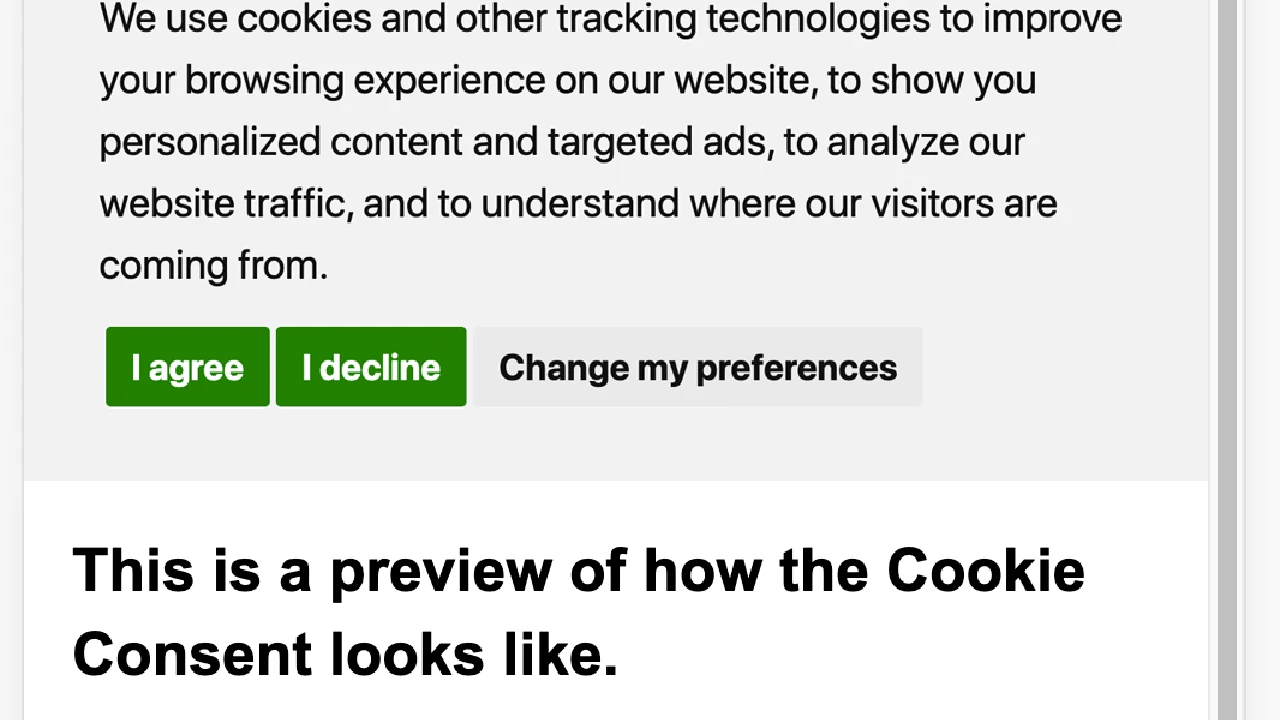
Most cookie banners present you with a few key options:
- Accept All / Allow All: This is the easiest option, but it means you're consenting to all types of cookies, including tracking and advertising cookies. Only click this if you're comfortable with extensive tracking.
- Reject All / Deny All: This option, if available, is the most privacy-protective. It prevents all non-essential cookies from being placed on your device. Some websites might make this option less prominent or require more clicks.
- Manage Preferences / Customize / Settings: This is your best friend for granular control. Clicking this usually opens a more detailed panel where you can individually enable or disable different categories of cookies.
Cookie Categories Essential Functional Analytical and Marketing
When you click 'Manage Preferences,' you'll typically see cookies categorized. Understanding these categories is key to making informed choices:
- Strictly Necessary / Essential Cookies: These are vital for the website to function. They enable core functionalities like security, network management, and accessibility. You usually cannot disable these, as the site wouldn't work properly.
- Functional Cookies: These enable enhanced functionality and personalization. They might remember your username, language preferences, or region. Disabling them might mean losing some personalized features.
- Performance / Analytical Cookies: These collect information about how visitors use a website, like which pages are most popular, how long users stay on a page, and if they get error messages. This data is usually aggregated and anonymous, but it can sometimes be linked to individual behavior.
- Targeting / Advertising / Marketing Cookies: These are the third-party cookies used to track your browsing habits across websites and build a profile of your interests for targeted advertising. These are the ones you'll most likely want to disable if privacy is a concern.
Pro Tip: Always go into 'Manage Preferences' and deselect 'Marketing' or 'Targeting' cookies. Often, you can also deselect 'Analytical' or 'Performance' cookies without significantly impacting your browsing experience, though some sites might become slightly less optimized for you.
Tools and Strategies for Better Cookie Management and Online Privacy
Beyond just clicking on banners, there are several tools and strategies you can employ to take greater control over cookies and enhance your overall online privacy.
Browser Settings and Built-in Privacy Features
Your web browser is your primary interface with the internet, and it offers powerful built-in tools for managing cookies.
- Block Third-Party Cookies: Most modern browsers (Chrome, Firefox, Edge, Safari) allow you to block all third-party cookies by default. This is a strong first step to limit cross-site tracking.
- Clear Cookies and Site Data: Regularly clearing your browser's cookies and site data can help remove trackers. Be aware that this will log you out of websites and reset some preferences.
- Do Not Track DNT Feature: While less effective than it once was due to lack of widespread adoption by websites, the 'Do Not Track' setting sends a signal to websites that you prefer not to be tracked.
- Enhanced Tracking Protection: Browsers like Firefox offer 'Enhanced Tracking Protection' which actively blocks known trackers and third-party cookies. Safari has 'Intelligent Tracking Prevention' (ITP) that limits cross-site tracking.
- Incognito Private Browsing Mode: While useful for not saving your browsing history or local cookies for that session, it doesn't prevent websites from tracking you during that session or block third-party cookies unless your browser is configured to do so.
Browser Extensions for Advanced Cookie and Tracker Control
For more granular control and automated privacy protection, browser extensions are invaluable. Here are some top recommendations:
uBlock Origin Comprehensive Ad and Tracker Blocker
Description: While primarily known as an ad blocker, uBlock Origin is also an incredibly effective content blocker that can prevent many third-party cookies and trackers from loading. It's open-source, lightweight, and highly configurable.
Use Case: Ideal for users who want to block ads, trackers, and malicious domains efficiently without slowing down their browser. It uses various filter lists to achieve this.
Comparison: More resource-efficient and powerful than many other ad blockers. It's not just about hiding ads; it prevents them from loading in the first place.
Availability: Chrome, Firefox, Edge, Safari (via third-party forks).
Price: Free.
Privacy Badger Automatic Tracker Blocking
Description: Developed by the Electronic Frontier Foundation (EFF), Privacy Badger automatically learns to block invisible trackers. Instead of relying on lists, it observes which domains appear to be tracking you across multiple websites and then blocks them.
Use Case: Excellent for users who want an automated solution to block trackers without much configuration. It's particularly good at identifying and blocking new or less common trackers.
Comparison: Works differently from list-based blockers. It's more adaptive and focuses specifically on tracking, rather than just ads.
Availability: Chrome, Firefox, Edge, Opera.
Price: Free.
Ghostery See and Block Trackers
Description: Ghostery allows you to see all the trackers present on a webpage and gives you the option to block them individually or by category. It also offers an 'anti-tracking' feature to anonymize your data.
Use Case: Good for users who want transparency about who is tracking them and desire fine-grained control over each tracker. It provides a clear visual representation of tracking activity.
Comparison: Offers more visual feedback on trackers than Privacy Badger and more direct control than uBlock Origin for specific tracker types.
Availability: Chrome, Firefox, Edge, Opera, Safari.
Price: Free (with a premium option for advanced features).
Cookie AutoDelete Automatic Cookie Cleanup
Description: This extension automatically deletes cookies and site data from closed tabs. It's a 'whitelist' approach, meaning cookies are deleted by default unless you specifically tell it to keep them for certain trusted sites.
Use Case: Perfect for users who want to ensure that tracking cookies are removed as soon as they leave a website, without having to manually clear their browser data. It helps maintain a cleaner browsing environment.
Comparison: Focuses specifically on cookie management, offering a more automated and less intrusive way to clear cookies than manual browser settings.
Availability: Chrome, Firefox, Edge.
Price: Free.
Consent-O-Matic Automating Consent Choices
Description: This clever extension aims to automate your choices on cookie consent banners. You set your preferences once (e.g., always reject marketing cookies), and Consent-O-Matic will try to apply those choices automatically whenever it encounters a compatible banner.
Use Case: Ideal for users who are tired of manually interacting with every cookie banner and want to streamline their privacy choices. It saves time and reduces 'consent fatigue.'
Comparison: Unique in its approach to automating banner interaction, rather than just blocking trackers. It respects your preferences by attempting to interact with the banner's controls.
Availability: Chrome, Firefox.
Price: Free.
VPNs and Secure Browsers for Enhanced Privacy
While not directly related to cookie banners, using a Virtual Private Network (VPN) and privacy-focused browsers can significantly enhance your overall online privacy, making cookie tracking less effective.
- VPNs: A VPN encrypts your internet connection and masks your IP address, making it harder for websites and third parties to identify your location and track your activities across different sessions.
- Privacy-Focused Browsers: Browsers like Brave, DuckDuckGo, and Tor Browser are built with privacy at their core, often including built-in ad and tracker blockers, and more aggressive cookie management features by default.
The Future of Cookie Consent and Online Tracking
The landscape of online privacy is constantly evolving. While cookie consent banners are prevalent now, the industry is moving towards new solutions.
Cookieless Tracking Alternatives and Privacy Sandbox
Google, for instance, is phasing out third-party cookies in Chrome and proposing alternative 'Privacy Sandbox' initiatives. These aim to allow advertisers to target audiences without relying on individual cross-site tracking. While the intentions are good, the effectiveness and privacy implications of these new technologies are still being debated.
Global Harmonization or Fragmentation of Privacy Laws
We might see either a greater harmonization of data privacy laws globally, or continued fragmentation, requiring businesses to navigate a complex web of regulations. This will undoubtedly impact how cookie consent is handled in the future.
User Empowerment and Education
Ultimately, the power lies with the user. As regulations evolve and technologies change, staying informed and actively managing your privacy settings will remain crucial. Understanding cookie consent banners is just one piece of the puzzle in taking control of your digital life.
So, the next time a cookie banner pops up, don't just blindly click 'Accept.' Take a moment to understand your options, manage your preferences, and leverage the tools available to you. Your online privacy is worth the extra click.
:max_bytes(150000):strip_icc()/277019-baked-pork-chops-with-cream-of-mushroom-soup-DDMFS-beauty-4x3-BG-7505-5762b731cf30447d9cbbbbbf387beafa.jpg)